


ShopSavvy - Barcode Scanner
4.120.47K Reviews
App Specs
- Version
- 18.9.41
- Updated On
- License
- Free
- Downloads
- 10,000,000+
- Developer
- ShopSavvy, Inc.
- Categories
- Shopping
- Platform
- Android, iOS
Screenshots

 Analysis by AppCompare
I use a barcode scanner most when a product is already in front of me and I want a quick reason to buy it—or to put it back. That is the practical appeal of ShopSavvy - Barcode Scanner: it gives price checking a place in the shopping trip, rather than making me search from scratch later. It is a free shopping app from ShopSavvy, Inc., with a 4.2 average from around 114,000 ratings and over 10 million installs. I’d treat it as a useful comparison tool, not a guarantee that every retailer or offer will appear.
When a scan helps more than a search
A barcode is most useful when product names are easy to confuse. Think of two packages that look alike but differ in size, model, or edition: scanning the item can be a cleaner starting point than typing a broad phrase and sorting through near matches. I’d still check the product details on the result before comparing prices. A lower number is only a meaningful saving if it refers to the same item and a comparable purchase.
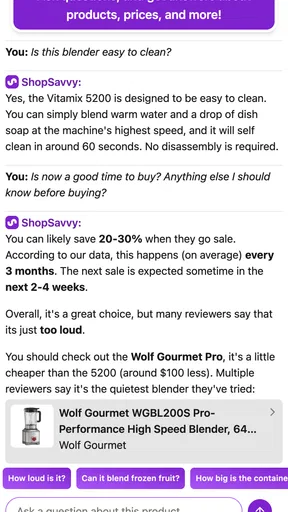
For an everyday example, imagine I’m looking at a kitchen appliance in a shop and wondering whether to buy it now. I can scan its barcode, check the available comparisons, and consider the historical pricing information before deciding. If the current price looks ordinary rather than compelling, I can hold off; if I need it today, the comparison can still help me judge whether another listed option is worth pursuing. The app helps me make a more informed choice, but it cannot decide whether waiting, delivery, or a particular seller suits my circumstances.
How I’d use the comparison results
I wouldn’t stop at the first price shown. I’d verify that the listing matches the barcode, then look at the retailer and availability before treating it as a real alternative. A result from a store I can’t conveniently use may be less attractive than a slightly higher price from somewhere practical. This small check matters because the purpose is to compare realistic options, not just the biggest difference on screen.
Price history is another reason to look beyond a single scan. It can add context when I’m deciding whether an apparent deal is worth acting on, especially for a purchase that can wait. It is not a promise about what a price will do next, so I’d use it as a clue rather than a forecast. For something I need immediately, today’s available choices matter more than a chart suggesting I might have saved by waiting.
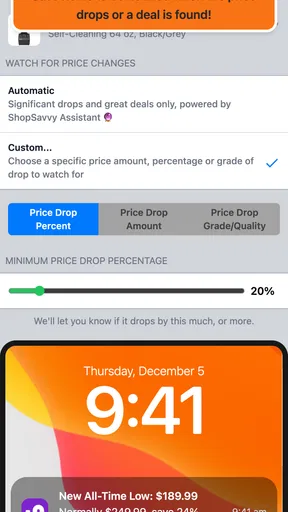
Alerts can suit people who have a particular product in mind but aren’t ready to buy. I’d use one for a planned purchase rather than setting alerts for every item I happen to scan; otherwise, notifications can become noise and make it harder to notice the change that matters. That workflow—scan while browsing, check the context, and save attention for products I genuinely intend to buy—is more useful than treating every comparison as a shopping mission.
Unpacking the Features
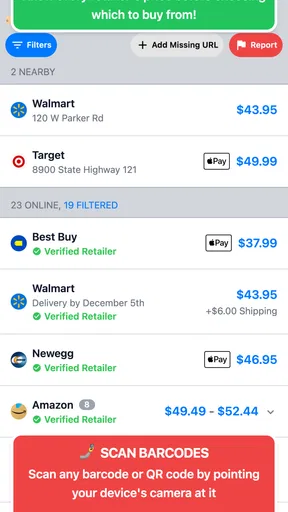
First things first, let’s talk about what ShopSavvy - Barcode Scanner brings to the table. The app's main feature is its barcode scanner, and let me tell you, it’s a game-changer. You simply use your phone's camera to scan the barcode of any product, and voilà! The app pulls up a list of prices from various retailers, both online and brick-and-mortar. It's like having a personal shopping assistant right in your pocket.
Worth Reading Before You Choose

EA SPORTS FC Mobile 26 Is a Bigger Football Game, but It Takes Time

Flipboard Shows What News Apps Must Do Beyond the Feed

Switching to Android Auto Means Rethinking Your Driving Routine

Google Calendar Makes a Crowded Week Easier to Manage

Ludo King Makes the Most of the Minutes Between Plans

Baby Panda World Brings Quick Play to Modern Phones, but Its Game Library Feels Busy
A User-Friendly Experience
Navigating the app is a breeze, even if you're not the most tech-savvy person. The interface is clean and intuitive, which makes it easy to find what you need. There's a search bar at the top, allowing you to manually enter product names if scanning isn't an option. But honestly, who doesn't love the thrill of scanning?
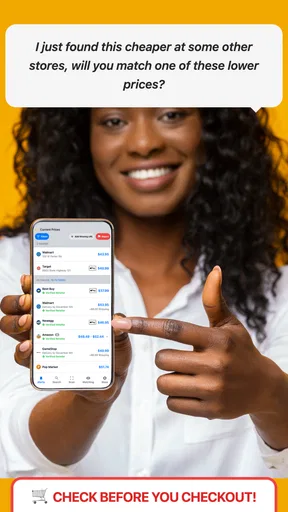
The results page is well-organized, showing you the price, store name, and availability at a glance. You can even set up alerts for price drops, ensuring you never miss a deal. Trust me, this feature alone makes it worth downloading.
Digging Deeper into Deals
One of my favorite aspects of ShopSavvy is the ability to see historical pricing data. This means you can track how the price of an item has fluctuated over time, helping you decide if you're truly getting a good deal or if it's better to wait. It's like having insider information without doing all the legwork yourself.
Additionally, the app allows you to compare prices across hundreds of stores, both local and international. Whether you're shopping for electronics, clothing, or groceries, ShopSavvy's got your back.
Where it fits among shopping tools
Compared with searching the web manually, scanning can save effort when I have the exact packaged product in hand. A general search may turn up similar items that are not identical, while a barcode gives me a more focused route into a comparison. On the other hand, a retailer’s own app or website may be the better choice when I already know where I want to buy, need that seller’s full product information, or want to check its own stock and terms. I see ShopSavvy as a useful second opinion, not a replacement for every store’s own checkout details.
It is also worth remembering that a comparison service is only as helpful as the options it can show for the item I’m checking. The app’s broad retailer coverage is useful, but I wouldn’t assume every nearby shop or every possible offer will be represented. If the scan returns few relevant choices, I’d try the manual search and then check a retailer I trust directly. That extra step is especially sensible for a costly purchase, where a mistaken match or an inconvenient seller can wipe out the apparent advantage.
A Few Quirks
While I’m a big fan of the app, it's not without its quirks. Occasionally, the barcode scanner can be a bit finicky, especially in low-light conditions. But let’s face it, no app is perfect, and a quick manual entry usually resolves the issue.
Another minor gripe is that some smaller retailers might not always be listed, which could mean missing out on potential deals. However, the app is continually updated, so hopefully, this will become less of an issue over time.
Who should keep it handy
I think it suits people who often compare packaged goods, electronics, appliances, or other purchases where the product has a barcode and the decision can benefit from checking more than one seller. It is particularly handy for someone who likes to research before committing: scan in a shop, compare the result with the price on the shelf, and use price history or an alert when there’s no need to buy immediately.
I’d skip it as a primary tool if most of my shopping involves fresh, unpackaged items, if I only buy from one preferred retailer, or if I expect every local shop to show up in a comparison. It also won’t replace careful checks of the exact model, seller, and final purchase conditions. For a quick scan and a sensible shortlist, it can help; for a complete account of every factor in a purchase, I still need to do some checking myself.
Practical questions before relying on a result
If a barcode won’t scan, I’d first improve the lighting and hold the phone steady, then use the manual search option rather than repeatedly aiming at the label. If the result looks wrong, I’d compare the product name and identifying details with the packaging instead of assuming the barcode has produced a perfect match. Those steps keep a scanner from turning a small inconvenience into a misleading comparison.
For a decision about whether to buy now, I’d ask two separate questions: is this the exact item, and is the listed option actually convenient for me? Price history and alerts can help with timing, but they don’t answer either question on their own. And if I’m wondering whether the app costs anything to install, it is free, though it offers in-app purchases ranging from $0.99 to $199.99 per item. I’d review any purchase prompt carefully and choose only what makes sense for my use.
Version and ongoing expectations
The current version is 18.9.8, and it runs on Android 6.0 or later. The app is rated for Everyone. Those details make it easier to judge basic compatibility, but a version number by itself doesn’t tell me what has changed from an earlier release. I wouldn’t assume a particular new feature or improvement solely from seeing the current version; I’d look at what the app actually does on my device and whether its comparisons fit my shopping habits.
For existing users, the main reason to keep ShopSavvy around is the repeatable workflow: scan a product, compare what appears, and use the history or alerts when a purchase can wait. The main thing I’d watch in future use is whether the items I personally care about produce relevant matches and useful retailer choices. If that remains true, the app earns its place as a quick check; if my searches repeatedly miss the stores or products I need, a retailer’s own search or a general web search may be more practical.
Final Thoughts
In conclusion, if you're serious about saving money and love finding the best deals, ShopSavvy - Barcode Scanner is a must-have app. It’s like having a personal shopper that never sleeps, always on the lookout for the best prices. With its easy-to-use interface and comprehensive price comparisons, this app truly stands out in the crowded marketplace of shopping apps.
So, next time you're out shopping, give ShopSavvy a try. You might just find yourself wondering how you ever shopped without it. Happy scanning!
Pros
- Fast and accurate barcode scanning.
- Comprehensive price comparison tool.
- User-friendly interface design.
- Supports a wide range of retailers.
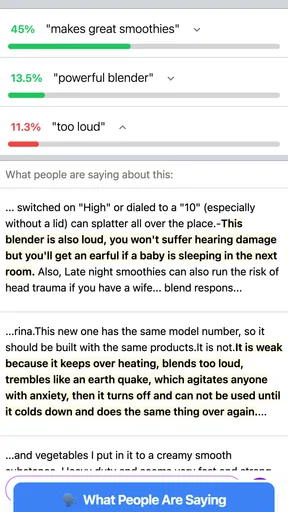
- Includes product reviews and ratings.
Cons
- Occasional network connectivity issues.
- Some ads can be intrusive.
- Limited offline functionality.
- Not all stores are covered.
- Requires location access for deals.
FAQs for ShopSavvy - Barcode Scanner
What is ShopSavvy - Barcode Scanner and how does it work?
ShopSavvy - Barcode Scanner is a mobile application designed to help users find the best deals on products by scanning barcodes. Once a barcode is scanned, the app searches for prices across various retailers, both online and in-store, providing a comprehensive comparison. This allows users to make informed purchasing decisions and potentially save money.
Is ShopSavvy - Barcode Scanner free to use?
Yes, ShopSavvy - Barcode Scanner is free to download and use. However, the app may offer in-app purchases or premium features that enhance the user experience. These features could include ad removal, access to exclusive deals, or additional scanning capabilities. Users can choose whether to purchase these additional features.
What devices are compatible with ShopSavvy - Barcode Scanner?
ShopSavvy - Barcode Scanner is available for both Android and iOS devices. It requires a device with a built-in camera to scan barcodes effectively. The app is optimized to work on smartphones and tablets, providing a seamless experience across various screen sizes and operating systems.
How accurate are the price comparisons provided by ShopSavvy?
ShopSavvy strives to provide accurate and up-to-date price comparisons by aggregating data from numerous retailers. However, prices can fluctuate rapidly, and there may be slight delays in updates. It's always a good idea to verify prices directly with the retailer before making a purchase to ensure accuracy.
Does ShopSavvy - Barcode Scanner require internet access to function?
Yes, an internet connection is necessary for ShopSavvy to perform price comparisons and access the latest product information. The app needs to connect to its database and various retailer websites to provide users with the most current data. A stable connection ensures the best performance and accuracy.


